 Parrot
Help during the call.
Not after it.
Parrot listens along on your Mac, suggests answers from your own documents, and keeps every call where it belongs. Free and open source.
17 MB. macOS 14 or later on Apple Silicon. or build from source

Northwind, 10:00
Waiting for the call to start.
Type a line or two before you hit record, and the copilot knows who you're talking to. Your documents are already in play.
No bot joins your meeting
Parrot records what your Mac already plays and hears. Nothing shows up in the participant list.
Audio never leaves your Mac
Transcription, speaker detection and your documents all run on your own machine.
Works with anything that makes sound
Google Meet, Zoom, Teams, a phone on speaker. If your Mac can hear it, Parrot can.
- Open source, GPL-3.0
- No account
- No telemetry
- Signed and notarized
- macOS 14+, Apple Silicon
Knowledge base
Brief it like a new teammate.
Drop in your pricing sheet, your FAQ, your playbook. Parrot reads them on your Mac and answers from them on the call.
Documents
The copilot grounds its answers in these and cites the source. Indexed on this Mac, never uploaded.
No documents yet.
On the next call
The copilot will quote it here.
Drop in a PDF, a text file, or markdown.
Your documents stay here
PDF, text or markdown. They're chunked and embedded on this Mac with Apple's own language framework. Nothing is uploaded, ever.
It says where an answer came from
Every card names its source: your document, or the words general knowledge. You decide whether it may answer beyond your files at all.
Coaching instructions and a pre-call brief
Standing guidance for every call, like keep answers short and always offer three price options. And one line before you hit record, so the copilot knows who you're talking to from the first second.
You pick the brain.
The copilot needs a language model. Parrot doesn't care which one, and it never sends audio to any of them.
Your own API key
Claude
The sharpest live cards. A full hour of calls costs a few cents on Haiku. The key lives in your Keychain.
Free and offline
Ollama
A local model on your Mac. No key, no account, no network. The whole app runs with the Wi-Fi off.
Anything OpenAI-compatible
Your own server
Point Parrot at a URL. LM Studio, a box in your office, whatever you already run.
Pause
One button on the call screen. While paused nothing is sent and nothing is spent.
Pace
Relaxed fits free tiers. Fast is for calls where every second counts. You also choose how much of the conversation each request carries.
Profiles
Sales discovery, a 1:1, an interview. Each profile has its own cards, gauges and tone.
| One hour of calls, roughly | Claude | Local |
|---|---|---|
| Transcription, on-device Whisper | $0.00 | $0.00 |
| Live copilot cards | $0.06 | $0.00 |
| Post-call report | $0.01 | $0.00 |
| Speaker detection | $0.00 | $0.00 |
Every meeting shows its real cost: model, tokens, calls, minutes. Local features show $0.00, proudly.
After the call
The report is written before you've hung up.
Summary, pain points, commitments. Then a coaching report on the call itself.
Coaching, not just notes
Talk ratio, what went well, what to improve, objections handled versus missed, and every commitment made.
Playback that follows the transcript
Click a line, hear that moment. Right-click a line to fix a speaker, or to trim the nonsense after you forgot to hit stop.
Names, not Speaker 2
On-device speaker detection tells people apart. Name a voice once and Parrot suggests who's talking next time.
Old recordings welcome
Drop an audio file on the app. It's transcribed, diarized and summarized like a live call. An optional polish pass re-transcribes with a large model for pennies.
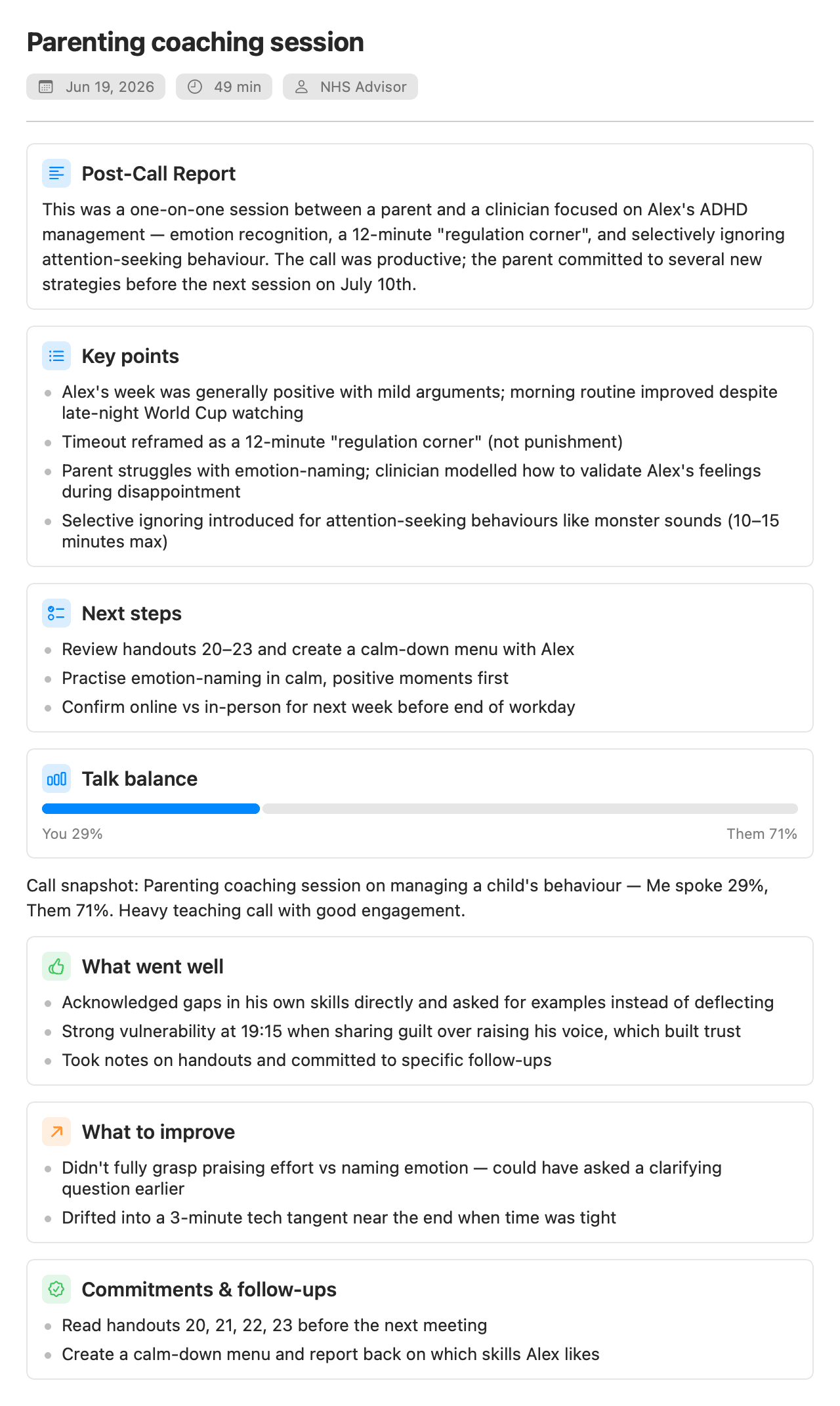
What leaves your Mac.
The honest list. It is short.
- Audio
- Never. Not to us, not to anyone. There is no us.
- Transcript text
- Only to the AI provider you chose, only if you turned the copilot on. Settings say exactly what is sent.
- Your documents
- Never. Embedded on-device with Apple's language framework.
- Network, by default
- One request a day to GitHub, to check for a new release.
- Accounts, telemetry, analytics
- None. There is no server to phone home to.
This page has no cookie banner because there is nothing to consent to.
There is nothing to certify because there is no server. The code is small enough to read in an afternoon, and the security policy asks you to try.
Read the security policy- About 13k lines of Swift
- Two real dependencies
- Keys live in your Keychain
- Releases signed and notarized
From Uygar
Hi, I'm Uygar.
Parrot is a fun project of mine that got a little out of hand, in the best way.
I spent years using call recorders and meeting assistants for work. There was always something. The one feature I needed wasn't there, or it was locked behind a plan I didn't want, or my client calls had to travel through somebody else's cloud and I was supposed to be fine with that. Nobody was building the tool I had in my head. At some point I stopped waiting and built it.
I've been running my own business on it since, real client calls every week, and honestly, it helps me a lot. It remembers what was promised, catches the questions I dodged, and my calls stay on my Mac where they belong. It felt too useful to keep to myself. So here it is, free and open source, for anyone who wants the same thing.
I build it with Claude as my coding buddy, late nights included. It's a personal project, so be kind to its rough edges, and loud about its bugs. Both help.
Uygar
It's free and stays free. If it saves your day once in a while, you can buy me a coffee. No pressure, the parrot eats seeds anyway.
Open source
Read it. Fix it. Make it yours.
Native Swift, one repo, GPL-3.0. The whole app fits in an afternoon of reading, and FILEMAP.md tells you where everything is.
Where I could use a hand
- Speaker detection with overlapping speech and similar voices
- macOS permission edge cases around audio-capture taps
- Bugs, ideas, and telling me I'm doing something wrong
git clone https://github.com/turantekin/Parrot.git
cd Parrot
make run
That compiles with swift build, assembles Parrot.app, signs it with whatever identity you have, and launches it.
Ready to try Parrot?
Three steps, no account, nothing to configure.
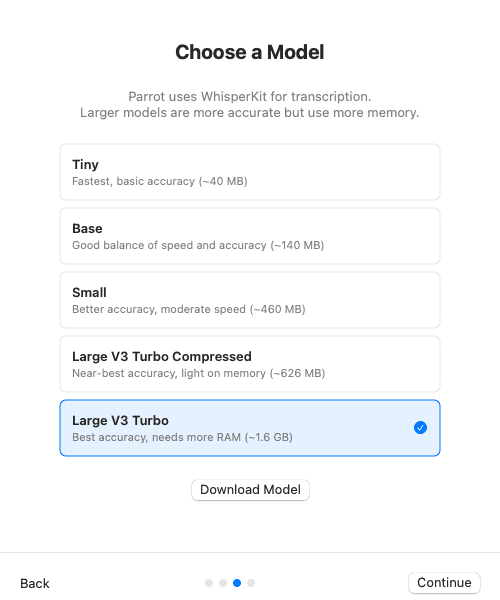
1.Download and pick a model
One signed DMG. Choose a Whisper model on first launch; it downloads once and runs on your Mac from then on.
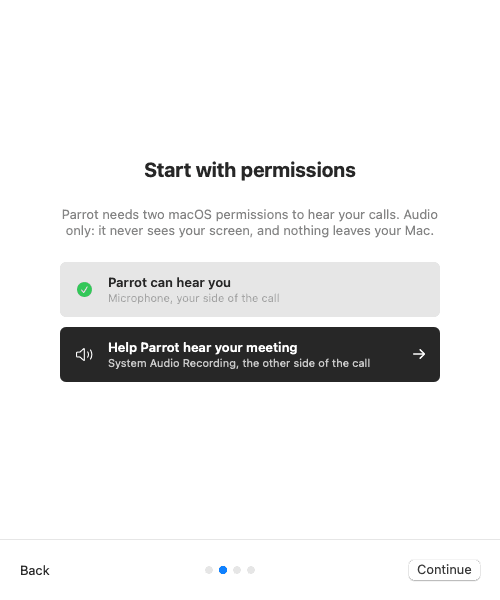
2.Allow two permissions
System audio for the other side, microphone for yours. The welcome tour deep-links to the exact settings panes.
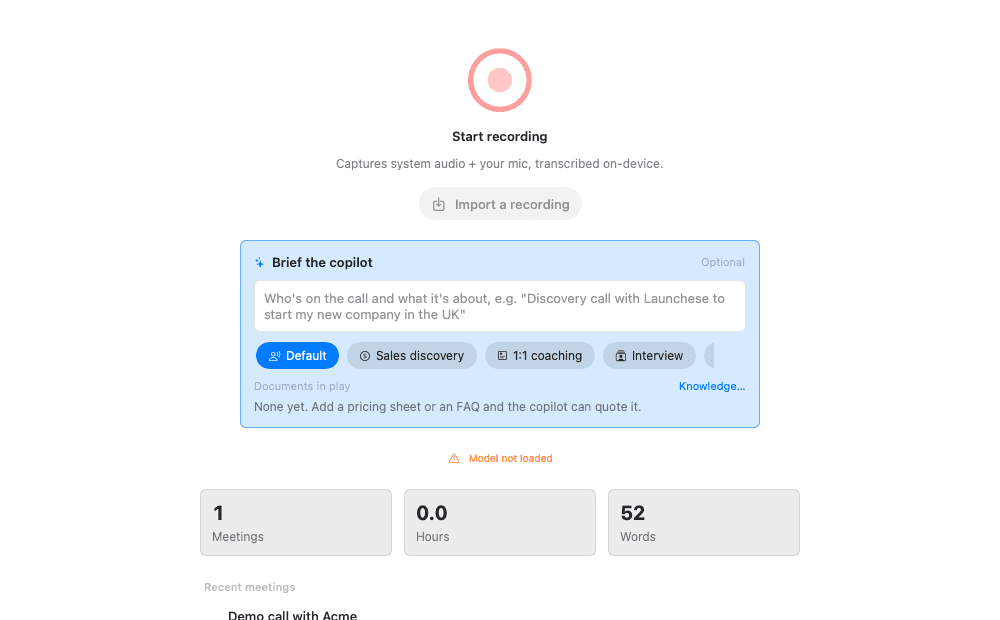
3.Hit record on your next call
Google Meet, Zoom, Teams, anything. The copilot panel opens next to the live transcript.
17 MB. macOS 14 or later on Apple Silicon. or build from source